Wednesday, 3 December 2014

Reflecting Upon Technology in Education


                After having completed the vast majority of this course, I feel that I have accomplished much more than expected upon joining. That is not to say that I completely underestimated the course, however I will admit that I expected my tech-savvy nature to lessen the "weight" of the course. While having some technical prowess didn't hurt along the way, I must say that this course shifted my technological focus. I now know more about how to use the internet, social networking, and other online tools as a professions, as a teacher (and not, as I usually do, as a consumer). Most of my experience with technology revolves around making my own personal life more easy and interesting, or for personal communication. This has come in handy for being able to, say,  set up equipment or prepare computers/software for classroom use. But I really felt that I've needed to learn more about using classroom tech in more effective ways, with more pedagogical creativity and range. This course has certainly opened my eyes in that regard. It will take some long-term practice and implementation to solidify what I have learned, but this experience has laid the groundwork for a great beginning. I have a wide variety of options to explore in front of me, and at the same time have a great basic foundation (i.e. a blog, twitter account, about.me page, etc).

                Speaking of variety, I certainly identified with the idea of changing things up regarding the modalities of all of this technology. There are visual learners, audio learners, tactile learners, and so forth - much like we ought lend attention to Gardner's theory of multiple intelligences, we ought also to extend this line of thought toward our implementation of classroom tech. I liked that our assignments laid this out for us, in that we were spending some weeks focusing on audio-centric activities, and later visual, for example. Technology is best when it expands, and doesn't limit, our horizons.

                Finally, this course has shown me some more extended, professional usage of social media that I've hitherto ignored. Generally, I've used things like Facebook for personal news among my personal social circles, and Twitter for a personalized news feed (in fact, my personal twitter account STILL reads 0 tweets - it's used for intake only!). But I can see the utility of using social media from a professional standpoint (perhaps with separate, professional accounts  - worlds need not collide, and such). You can reach your students in so many ways, and furthermore you can create professional networking opportunities with other colleagues in the education profession. All of that said, I'm still wrestling a bit to find my personal comfort zone with social media in a professional setting. I keep my personal social media fairly conservative (undercover, if you can tolerate some hyperbole), and have a mind for personal privacy that I cannot ignore. As harmless (or even beneficial) it may seem to google my name and find a bunch of teaching-related correspondence, I just flat-out don't like that notion. I'm the curmudgeon who would go to the effort to un-list my number from the phone book if it were still a relevant thing to do in this day and age. And yet  I'm new-school enough to be a cord-cutting, cell-phone-only technophile. Nevertheless, I'm sure I can figure out how to have my cake and eat it too, and it will just require some careful planning regarding usernames, privacy settings, and so forth. I'm sure you all have your own perspective on this matter, and hopefully you're able come to your own comfort zones without having to resort to the -dare I say - "cop out" cutting off all ties to social media or technology completely.

Thanks for everything you've all shared in this course, and hopefully you were able to enjoy my contributions as well. Feel free to keep me in your G+ circle for future contact if the necessity ever arises!

-Matt Goldhawk

Wednesday, 5 November 2014

5 Ways to Use Audio in Your Classroom

1. Peer Podcasts
http://carlosjuniorsousa.files.wordpress.com/2014/04/interview-microphone.jpg

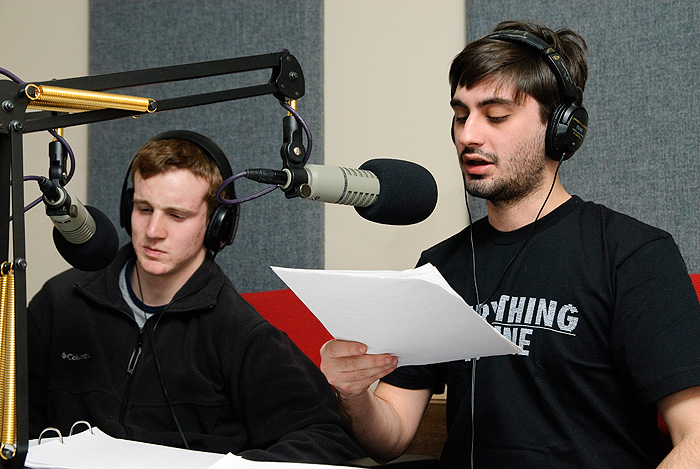
                This one works well in particular if your students already have a grasp on the basics of making a podcast, but this is not a requirement. Imagine a large project is completed - maybe the students have put together their culminating science fair project, for example. As an additional side-assignment, students could be responsible for doing an interview-podcast w- they could interview the classmate whose project was most impressive or eye opening. This benefits students by giving them experience in a (perhaps) unfamiliar territory, the auditory modality. Furthermore, this provides a great assessment-as learning opportunity, as the interviewer performs a form of peer evaluation, while the interviewee is simultaneously self-evaluating!


2. Background Music


                While this may require some finesse, I've generally been a proponent of allowing background music in the classroom for long periods of time spent doing seatwork, or some form of repetitive task. Even if silence is a sign of a well-managed classroom, said silence can approach uncomfortably boring levels. I like to offer background music as a reward to my students - a sort of privilege that can be easily revoked if the classroom ruins it by treating it as an excuse for misbehaviour, loud voices, etc. It can be motivating for students to get the chance to choose songs as a reward for good behaviour or diligent work. It can also be relaxing to throw on some light, introspective instrumental music that might help students immerse themselves in their creativity, problem solving, writing, etc. .. Again, the use of music requires careful attention to its management in terms of rules and responsibilities - but if the class can get on board with behavioural expectations, it can be a nice way to maintain a motivated learning atmosphere, and may add some extra enjoyment to the learning process.


3. Radio Drama


                Most students (and even younger adults) would agree that the idea of listening to radio dramas is a bit of a lost art. It would be a fool's errand to expect students to remain engaged listening to any long-form production of this type. However - they might enjoy making their own. A group project of this sort allows for a seamless integration of English (creative writing) and Drama (with perhaps a dash of some computer technique). There's also the problem solving element of figuring out how to express the story without the aid use of visual cues. I believe students would enjoy this as a nice twist on conventional, independent creative writing. Also, their familiarity with their fellow classmates might lend more enjoyment of listening to the finished projects together. Lastly, it's a nice form of performance without having to perform it live, which may be relieving to those students who wish to express themselves and yet struggle with the challenges of stage fright.


4. Audio Story Readings


                Students could be assigned a "book on tape" to listen to for a novel study or critical review. Length is of no issue here -what is important is that they are exposed to a good model of an audio book production. Perhaps they could be assigned to comment upon the use of voice in terms of pacing, clarity, enunciation, dynamics  - all of which must be carefully attended to in order to make an audio book sound captivating. This assignment could culminate in the production of their own audio book. They could read their own story if available, or a story of reasonable length. By analyzing spoken language in this manner, students are forced to think about language in a "meta" sense, and examine the spoken word actively where we're typically more passive.


5. Radio broadcasts


                I've never tried this, but I can imagine kids having a blast with this one: setting up a "live" broadcast of a school sporting event, Phys. Ed. event, or any activity that could require live on-the-scene commentary. This could be done as an audio-only event to mimic the radio, or could even be extended to audio-video to mimic a televised event. The key is that the event is recorded live. This will prove challenging, as puts a person in a position to think on their feet (ie improvise) and utilize whatever language resources they can muster on the fly. Afterward, they would have a recording which they could review and reflect upon  - what did I do well, and where do I need to improve? Much like I believe good estimation skills are essential to math education (and often underemphasized) , improvisation is a sort of inexact language skill that I've found is rarely exercised in the classroom.


-------------------------------------------------------------------------------------------------------------------------

If anyone happens to use any of these strategies, or has already done so in the past PLEASE feel free to comment. I'm curious to hear other professional opinions that might add to or modify my perspective on using audio in the classroom!

For further ideas, feel free to check out the lilnk below:

http://taccle2.eu/wp/wp-content/uploads/2013/04/31InterestingWaystoUseAudioinyourClassroom2.pdf

The above certainly helped springboard my teacher-brain into creative action.

Monday, 27 October 2014

Web 2.0 Teaching Tools - A Selected Exploration

Greetings fellow readers!
For this post, I am going to explore some web-based tech tools which I've found (or hope to some day find) useful for my classroom. Perhaps you've heard of some or all of them, and perhaps not. Either way, I hope these quick reviews are helpful to those who can use them. As always, feel free to comment below - I'm especially interested in hearing perspectives, pro/cons, etc that differ from my own!

---------------------------------------------------------------------------------------------------------------------


This resource can be used by students to create chronological timelines. There are many other resources that can do this (eg Timeline, Time Toast), so what make this one special? The ability to zoom for detail. Using this tool allows the user to create a basic, "biggest picture" timeline which only shows the important details/events by time. These would show up at zoom level 0. However, they can include further details on zoom levels up to 100. So, zoom level 0 would show the biggest, general picture, while zoom level 100 would show the tiniest, more trivial details - and everything in-between can be specified for zoom levels between 0-100.

This tool can help students organize their learning of a topic in virtually any subject area.
However, the more exciting, hidden skill that this tool can nurture is......*drum roll*......Summarization!

By examining their material and prioritizing it based on zoom level, students are implicitly refining their ability to rank their information by importance. In doing so, they will develop a keener eye for the gray area of creating a summary. Students often ask "how much is too much? Ho w little is not enough?". This tool can help give them the instincts they need to answer such questions.
you can find this tool at www.timeglider.com
Also, here is a video that demonstrates its inner workings:


Admittedly, this is a popular one - and for good reason. I've spent many a night searching for "that perfect video" on youtube, sometimes successfully but more often not. Youtube is simply too general, and, while you can find good stuff there, you may have to sift through a considerable list of off-topic, irrelevant search results until you find what you're looking for. With Teacher Tube, search results yield exclusively educational material - much of which is not even posted to YouTube. This tool also offers photos, audio clips, and documents as searchable items. As a Science teacher, I've found the use of video to be essential to my classroom. Science can be boring on paper, yet beautiful when visualized. It can be complicated on paper, yet obvious when demonstrated on screen.
 A concept such as diffusion can sound cumbersome by definition. "Listen class, it's simply the movement of chemicals from an area of high concentration to an area of low concentration". This is the definition, and yet many student will furrow their brows in confusion when presented with this information verbally (or on paper). But, if they're shown a video like below, the figurative light bulbs often turn right on:

Of course, a hands-on demonstration also works well, but we don't always have the time or resources available to make that happen in every circumstance.
Finally, this tool also fosters the idea of sharing. It might be a good idea to create a rule that, if we're going to use Teacher Tube, we must contribute to it. A group assignment/project could be arranged (cross-curricular at that) involving the creation of an imaginative piece of media to share with the world via Teacher Tube or any related tool!


This tool has become more popular with my students in recent years as an alternative to MS Powerpoint (PPT). While, on the whole, it accomplishes the same basic goal as PPT, it has some appealing differences. First of all, it's "hip" - it provides the user with the chance to inject new forms of creativity into their presentations. By allowing the user the freedom to play with different level of zoom, rotation, and panning, for example, presentations can provide a feeling of spontaneity and adventure (all the while being covertly linear). Visual learners love this tool, and likely feel constrained by MS PowerPoint or Keynote (the Apple equivalent) and their relatively restricted (dare I say) old fashioned modes of presentation. Personally I'm still satisfied with PowerPoint, but I can't expect the same from my students any more than I can expect them to appreciate, say, 8-bit video games or the music of the 90s.

Prezi can be used for free IF the user is comfortable with their work being publicly available. To use this program on a stand-alone, private basis, the user must purchase a license.
--------------------------------------------------------------------------------------------------------------------------


And so ends this exploration - I hope you enjoyed it, and find use with the above in some professional capacity. For a list of many, many, MANY more potential classroom tech tools, check this out:

Wednesday, 15 October 2014

Blogging - Learning By Example

            Here we are, back to our classrooms after a nice, relaxing long weekend. I had a great time off, and I hope the rest of you did as well. While the holiday is a great chance to unwind or decompress, I did manage to sneak in some reflection time during some of my “sitting around” time – one of my favourite types of times.
            I explored some teacher-oriented blogs, 3 of which have especially intrigued me. I will review them below:


            The first thing that appealed to me about this blog was that it has a wide range of topics. While it all falls under a technology blanket, the writer applies his tech knowledge to various categories (e.g. Assessment, Arts, Science, Advocacy). I like that the categories are not simply course-based, but also touch upon other major areas of his experience (i.e. advocacy and assessment).
            If you explore any specific category, you’ll find tech resources that may be helpful to other teachers in the subject area. His most common resource is something called a “video story problem”, which uses videos to introduce a problem-solving scenario. One of my favourites, for example, took place in a hotel room. Noticing the complimentary shampoo bottles, he pondered: “I wonder how much shampoo a hotel goes through per year?” This question was illustrated with a  video:

Video Story Problem - How Much Shampoo? from Ben Rimes on Vimeo.


What a great way to attract attention to an otherwise fairly mundane question! In a textbook, this would likely come off as “just another boring, pointless question”. But, when framed in the humourous context of a regular guy sharing his random musings during a recent stay at a hotel, it allows the viewer to see that the question has validity from a Seinfeld-eqsue, minutia-examining perspective. Even when life is at its most boring level, it can be fun to wonder about silly little things like this.
            This approach also lends itself to blended learning, as it could be used to present a problem to students taking online courses. Of course, it can also be used to present online homework to a traditional classroom as well.
            The last thing I’ll mention about this blog is that it embraces the use of the Creative Commons. It does so under an “Attribution-NonCommercial-ShareAlike 3.0 Unported” license.
Let me translate this for you:

This blog may be shared (copied or redistributed in any format) or adapted (transformed, remixed, or built upon) as long as the following are attended to:

Attribution – credit must be given to the blog author if the material is to be used elsewhere
NonCommercial – material may not be used for commercial purposes
ShareAlike – If any of the content is to be transformed, remixed, or built upon, it must be shared by the same license as the original.


Blog #2 – eSchool News

I found this item in the list of top 100 blogs provided. It isn’t exactly a blog in the truest sense (perhaps it once was, and has grown?), as it contains contributions from multiple authors – this makes it more of an online newspaper of sorts. Nevertheless, I found the resource to be too useful to pass up reflecting upon it.
This website is a great resource for extensive “behind-the-scenes” or “meta” information about teaching with technology. News is categorized according to the following: Admin, Data, Curriculum, IT Management, Mobile, Online Learning, Policy, Professional Development and Social Media. It should be noted that this site is US-based, so be aware if/when exploring sections like, say, curriculum – it will not likely be as helpful for us Canucks.
Despite being US-based, however, this site has much to offer from a generic teaching standpoint. For example, the IT management section – I am the go-to “IT guy” at my school, and have helped in setting up IT infrastructure (e.g. a school-wide WiFi network, or the school computer lab administration). These things are always requiring maintenance, and, furthermore, they can always be improved to act more efficiently or securely. By keeping up with IT Management article *geared toward teachers*, I might discover better ways of maintaining/implementing technology in the future, be it on a classroom or school-wide basis.
Coincidentally, this site is in sync with our subject matter, as it current sports a front-page feature which reads “How to Make Blended Learning Work”. Clicking on this feature reveals a collection of 10 archived articles which have previously been posted to the site – certainly a great start point for any teacher trying to get their feet off the ground in said topic (myself included)!


            My final exploration landed me at Adventures in Educational Blogging. This blog certainly feels more close to home when compared to my current personal level of blogging skills. Because of this personal relationship, I suppose this blog has sparked more personal reflection out of me than others.
When compared to my own blog, I notice many similarities - of course, the fact that we’re both using Blogger as a publishing medium certainly has influence, but anyhow..
It has an original title and headline, and makes use of a sidebar to include other useful information. Said info includes a brief bio, archived posts by date, related links, the current weather in Singapore (nice reminder that the author is abroad – may affect reader’s perspective), and a Creative Commons license icon. The latter had become important to me in this week’s studies, and has made me realize that I should probably follow suit and register my own work. I’m happy to share, as long as it’s shared in a way I deem appropriate!
            The content of this blog is far less specific than were my previous 2 candidates. This can be refreshing in a way, as the unpredictability that chronological experience brings gives the writing more of a “grab bag” feel. For instance, this blog had posts regarding the author’s favourite iPhone apps, a toast to an appreciated substitute teacher, and an annual blog awards post.


So ends my reflection. The last general thing I’ll comment upon is that these blogs were, as far as I saw, written professionally and would have little problem adhering to the OCT Advisory or any similar document. This is of great importance primarily due to the potential permanence that comes with publishing anything online. If one is creating a professional blog (or the like), one must remember to do so as a representative of the teaching profession, as it is considered to be “on-duty” activity.


If you made it this far, thanks for reading. ;)

Thursday, 9 October 2014

Copyright Ownership and Fair Use – A Teacher’s Perspective

Recently, I’ve spent some time exploring the Creative Commons in terms of policies, content, licenses, etc. I will admit that, many times, I have come across the term “creative commons”, but until now had little idea as to the specifics of what it is. After my exploration, I am convinced that, from a teacher’s perspective, this is an excellent pedagogical tool.

Today’s growing children are experiencing more pure digital information than ever before. As things have become more digital, they become more accessible, widespread, and convenient. You could say that digital technology is a form of power, and can be beneficial or destructive depending on the moral compass of the beholder. While the ethics of copyright law today are still sorting themselves out*, it is abundantly clear that children need to grow an awareness for these issues, and so experiences with something like the Creative Commons can certainly help. By providing students with this tool, they will be exposed to a system that forces one to confront the concept of intellectual property (IP), and that, while the waters are “muddy”, blind outright IP theft is never the answer. The Creative Commons can help them understand with more clarity: why do we have to cite sources? What is/isn’t plagiarism? How would I feel if someone stole my work? And the biggest comtemporary doozy (in my opinion) – where is the right place to draw the line between freedom vs. ownership of information?

Furthermore, the Creative Commons is a great symbol of the idea of a free, egalitarian internet (can you guess what side of the Net Neutrality issue I fall upon?). While it certainly has its drawbacks and dangers, the internet has made the sharing of knowledge and culture reach astounding peaks. It allows the smallest person to be a producer of creative content, to share their perspective on life with the world. An ecosystem like the Creative Commons helps to foster the idea of sharing one’s work, while at the same time understanding the value of said work through a user-friendly licensing framework. It would seem that a system like this, if enforced faithfully, can allow us to have our cake and eat it too – a reasonable freedom of sharing and a reasonable level of IP protection!

So, you may be wondering - what does this have to do with teaching? Well, I believe that, as teachers, we have a tremendous influence upon the future of our communities/society via the direction in which we guide (not sculpt) our students. It is important not only to teach them to use the tools of tomorrow, but to learn from within how and why to use them responsibly. I think the Creative Commons can be very beneficial, especially for the latter.

                                             You can visit the Creative Commons at:
                                                      www.creativecommons.org


*Of course things like piracy, plagiarism, and IP theft are generally indefensible. However, one need only look at the state of today’s outdated <often ridiculous> patent system, the net neutrality debate, or perhaps the extortive behavior of “copyright trolls” to see that there is a great divide surrounding today’s intellectual property legislation. 

Friday, 3 October 2014

Welcome!

My name is Matt Goldhawk. I am an OCT-certified teacher from the Niagara Region - Fonthill, to be exact. I've lived in Niagara since the age of 10, which led me be to attending Brock University for my education. I completed a B. Sc. there (Biology/Chemisty combined), as well as minors in Music and Psychology. Afterward, I continued onward to obtain my B. Ed. for teaching at the Junior/Intermediate level. I've since taken an AQ course in Special Education, and and ABQ course in Intermediate/Senior Science, the latter which opened my options to teach children of a higher age level.

Currently, I am (primarily) a Science teacher at Royal Elite International Academy in St. Catharines, Ontario. I've been a teacher there since Sept. '13, and have been enjoying the process of meeting my new students for the 2014-15 school year. The courses I have taught thus far are:

Grade 10 Science (SNC2D)*
Grade 11 Chemistry (SCH3U)*
Grade 11 Biology (SBI3U)
Grade 12 Chemistry (SCH4U)
Grade 12 Biology (SBI4U)*
Grade 12 Individuals and Families in a Diverse Society (HHS4M)
Grade 12 Challenge and Change in Society (HSB4M)
* = teaching in current semester

Biographically, this is my story to date. However, life moves on and I intend to continue to develop my career. For an up-to-date biography/profile, you can always visit www.about.me/mrgoldhawk for  the most current version of the above.

The purpose of this blog is to maintain a record of my experiences as a professional. This could include challenges, ideas, strategies - anything I consider to be relevant to my personal development (and therefore may be of use to others, too!). From Oct '14-Dec '14 I will primarily share my findings related to my professional development in the area of education and computers/technology.

Welcome to my blog - I hope you enjoy your stay.